Spex Glance, Two Weeks Later: Moving an App Without Stranding Anyone
Moving a shipped app is a migration of its installs, not its code. How Spex Glance got a dedicated GitHub home without stranding anyone who'd installed it, grew an iPhone and Watch app from one codebase, and why Claude Code now does the heavy lifting.

tl;dr - Moved Spex to its own GitHub home. Existing installs keep updating. Shipped four Mac updates. Built an iPhone and Watch app in a day. Claude Code did the heavy lifting.
Where we left off
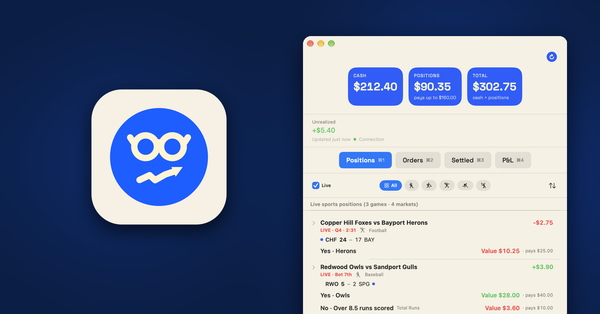
Two weeks ago I shipped Spex Glance, a small Mac app that watches my prediction market sports orders from the menu bar. It was built in about 24 hours with Claude Code doing the typing and me doing the deciding. Then it went live. Which created a problem I hadn't thought about yet: once an app is out in the world, every change you make has to carry anyone who installed it along with it.
I don't know how many people that is. I don't track installs. Could be a handful, could be none. So I had to build as if it was someone.
Here's what happened in the two weeks since.
Why a dedicated account
Everything lived under my personal GitHub account. That was fine for a weekend project. It stopped being fine the moment the app was public and had a roadmap. I decided Spex, and anything that spawns from it, gets its own dedicated GitHub account. Every commit, release and credit reads "Spex." Not a person's name. If a second app comes out of this codebase, it already has a home.
Why not just transfer the repos? Because a transfer drags the old history along, authors and all. So Claude Code and I did a clean copy instead. New organization, fresh repos, each starting from one clean commit. The old histories were archived as encrypted git bundles. Eight of them. Before anything got deleted, all eight were decrypted and cloned back as a restore test. All eight passed. Then they got deleted.
Development never paused. I was still shipping Mac updates while the move was in progress. Claude handled the parts that make migrations scary: the Sparkle signing key moved intact, the feed URL moved to the project's own site, and an installed copy wouldn't notice a thing. Seamless in the code, which is the only place it counts.
Moving house without stranding anyone
Copying the code was the easy part. The hard part was anyone who'd already installed the app.
Installed copies of the Mac app check for updates through Sparkle, at a feed URL baked into the app. That feed lived in the old personal repo. Move the repo, and every existing install goes silent forever. No error. No notice. Just no more updates, ever. And I'd never hear about it, because there's no way for me to know who has it.
Think of it like moving house. You can pack and move the furniture in a day. If you don't leave a forwarding address at the post office, your mail stops. So I left one. One last push to the old repo, version 0.3.2, that looks like an ordinary update but quietly points the app at the new feed. Install it, and from then on you follow the new home without doing anything. The update should take everything off their plate, and it does. The release note was one sentence.
The old repo is now a stub: a "moved" README and that one feed file, kept so any old install can still find the forwarding address.
The trap I almost walked into
The app's build number came from the git commit count. Easy, automatic, and a landmine.
Run the math. Say an installed copy is build 212. A fresh history starts counting from 1. Sparkle only offers an update if the build number is higher than the one installed. 1 is not higher than 212. Anyone who had the app would've been stuck, and I'd have had no way to find out.
The fix: the build number is now a committed file, and the release script refuses to build unless that number beats the newest build in both the new feed and the old bridge feed. That check is its own small script with its own tests. Thirty seconds of code that prevents a silent outage for anyone out there.
A few more things that bit me, in case they bite you:
- The GitHub CLI on my laptop was logged into my personal account by default. A release run as-is would've published the GitHub Release, the site deploy and the Homebrew bump under my name. Releases now pass the Spex account's token explicitly.
- GitHub's "Merge pull request" button authored merge commits under the account's display name, which wasn't exactly "Spex." Pull requests now get merged locally as signed Spex commits, then pushed.
- The release script's Markdown converter broke bullets that wrapped across lines and showed literal asterisks in the update dialog. New rule: one line per bullet, no bold.
I stopped relying on memory for identity. Folder-scoped git config commits everything inside the project as Spex. A hook rejects any commit with the wrong author. Every commit is SSH-signed. A secret scanner runs before every commit and again in CI. Hygiene as tooling, not discipline.
One codebase, every Apple screen
With the move done, I asked Claude to clean up the code so it could run anywhere in the Apple hardware ecosystem: macOS, iOS, watchOS, and tvOS down the road. Not four apps. One shared core, compiled into each target. The prediction market client, request signing, the live price socket, scoreboards, and the row and score views all live in one folder that every app builds from.
That cleanup shipped quietly as Mac 0.3.4. From the outside, nothing changed. It's the reason everything below was possible.
Four Mac updates went out in eight days. The short version:
- 0.3.2 made the move and redrew the icon.
- 0.3.3 shows orders the site cancels on its own, with the reason and time. Public data like schedules and scoreboards is now fetched without your key, so it stops counting against your API limit.
- 0.3.4 added a keyboard shortcut for live games only, and the shared-code cleanup under the hood.
- 0.3.5 added optional key sharing through iCloud Keychain. More on that below.
The phone and the watch
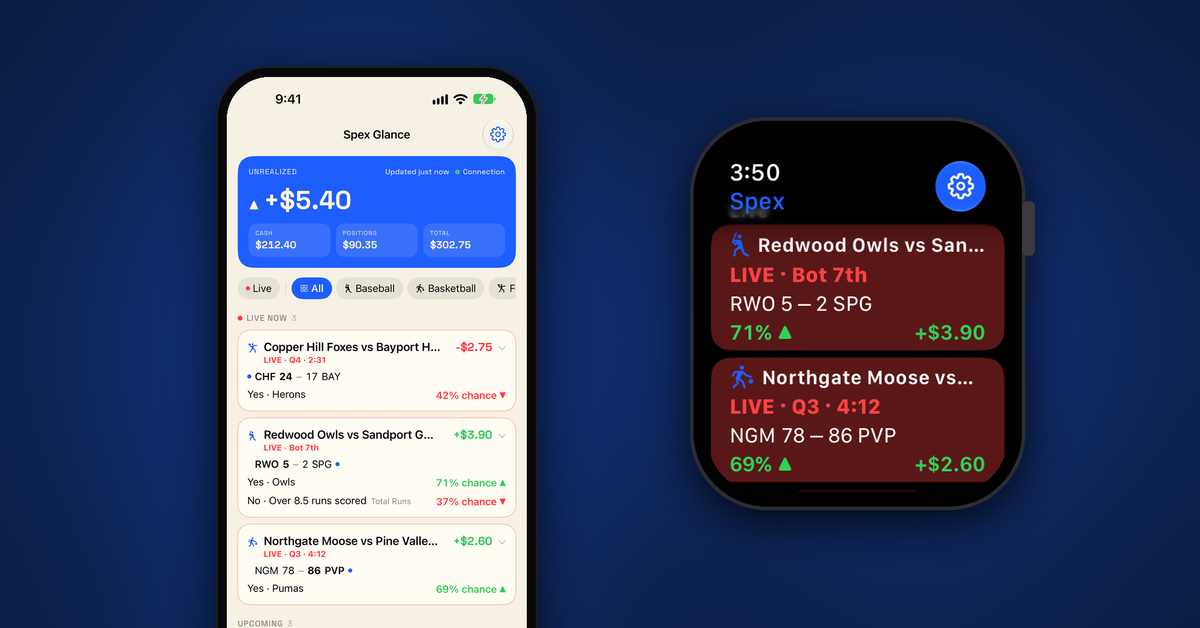
Once the core was shared, the obvious next step was TestFlight. An iOS and watchOS app that mimics the Mac app with as little new code as possible. Same repo, new targets, same rules: read-only API key, same scope check as the Mac, no server in between. If the key has anything beyond read access, the app refuses it.
Build 1 went to TestFlight on a Monday morning. Then I hit a wall.
The prediction market site generates your API key pair itself and downloads the private key as a tiny text file. There's no "make the key on this device" option. So the obvious iPhone setup flow, create a key and paste it, doesn't exist.
Build 2 worked around it: the app registers as a handler for plain-text files, so you can send the downloaded key straight to it from the Share sheet, AirDrop or Files.
That worked. It also raised the better question. The Mac already has a working key. Why make a second one at all?
So the Mac app and the iPhone app got opt-in key sharing through iCloud Keychain. Off by default. Turn it on and a copy of the key goes into iCloud Keychain, which Apple encrypts end to end. Only Spex Glance on devices signed into the same Apple Account can read it. The receiving device runs the same read-only check before it'll use the key. Turn it off and the shared copy is removed. A brand new Mac with no key gets offered the shared one on its welcome screen. I tested it for real, Mac to phone, and setup went from "find a file and AirDrop it" to flipping one switch.
The best feature of the two weeks came from a dead end.
Build 3 added the Apple Watch app. The watch never holds a key. The iPhone sends it a small snapshot and answers when the watch asks. You get a tiny app plus watch-face complications: unrealized P&L, top game, balances. Since those numbers are private, a switch on the watch hides dollar amounts. Build 4 brought the iPhone up to the Mac: a P&L tab with a step chart rebuilt from the site's settlement history, the site health dot, and Work Mode, which hides every dollar figure and the P&L tab entirely.
Four TestFlight builds, one day, each one answering a problem the previous one found.
Honest limits: the iPhone and Watch apps are in private testing only, and I'm the tester. I've been running them on my own phone and watch for a few days now. The widgets, the Lock Screen Live Activity and the watch complications all work on real hardware, and the screenshots below are from my devices, not a simulator. One tradeoff worth knowing: Live Activities update from the app itself with no push server, which keeps the no-server promise but means updates pause while iOS has the app suspended. I'm not promising a public release or a date. This is just a proof of concept.
The pipeline that made four builds in a day possible
Here's the part that still surprises me. I never touched App Store Connect by hand.
Claude wrote a ship script that archives the app, uploads it to App Store Connect, and updates TestFlight. It only bumps the build counter after a finished upload, so a failed upload doesn't burn a number. From "approved" to "new build on my phone" is under five minutes. Fix, ship, test, repeat. That loop is the whole reason four builds happened in one day instead of one week.
The website got the same treatment. Claude built debug-only launch flags that load sample data, booted the iPhone and Watch simulators, and took the screenshots itself. The new Spex Glance for iPhone and Apple Watch page shows the real widgets and the real watch complications, and I never took a screenshot. Nothing on the site shows a real account.
The app I didn't know existed
Halfway through all of this I found another Mac app doing roughly the same thing. Same prediction market site, menu bar, a small window. Its website looked a lot like mine. Same general layout, same kind of hero shot, same vibe. Nobody copied anybody. Two people solved the same problem and reached for the same obvious design.
Obvious is the problem. If a visitor can't tell the two sites apart in three seconds, neither of us wins.
So I had Claude pull up both sites side by side and compare them. Layout, colors, typography, how each one shows the app in action. Then I asked it to make mine look different, and it did, on its own. That's where the new "paper" look came from. Its own layout, its own type, and real screenshots of the widgets and the watch instead of a stock home screen. I didn't pick a color. I said "make it not look like that" and reviewed the result.
The apps themselves split in a way the sites now show. The other one lives in the menu bar. That's the whole product, and it's a fine one. Mine started there too, but it's grown into a full Apple ecosystem: Mac, iPhone, Apple Watch, with tvOS ready when I want it. Same core, every screen a user might want to glance at. That's the difference, and now the website says so without me having to.
How the work actually got done
Claude Code did the building. Partway through it moved onto an always-on Mac mini at home, reachable from my phone, so I could check on a build from the couch. Apple's signing and notarization stayed on the laptop. Nothing ships without my go-ahead: build locally, test, approve, then push, tag or release. The release notes are plain English, written for whoever reads them.
By the numbers: 4 Mac releases, 4 iPhone builds, about 35 commits, 8 restore-tested archives, 2 weeks.
I've spent 25+ years in IT keeping other people's software running. Now I'm the one shipping updates and thinking about whoever might have installed the thing. Different seat, same job. Customers first, even when you can't count them.
The takeaway
Two weeks ago my takeaway was that Claude could stand in for hiring a third-party developer on a small project. This time it's bigger. Claude Code can take over the heavy lifting of app development and codebase management. The migration, the signing, the multi-platform cleanup, the TestFlight pipeline, the website screenshots, the redesign. All of it. What's left for me is the part that should've always been mine: deciding what to build, testing it, and saying go.
None of this needed a company or a team. It needed a few rules I'd hand to anyone shipping a small app:
- Never derive your build number from commit count. Put it in a file and make the release script enforce it.
- Before you move anything an install depends on, leave a forwarding address. Ship the redirect first, then move.
- Make identity a tool, not a habit. Hooks, signing, explicit tokens. Memory will fail you on a Tuesday.
- Restore-test every archive before you delete the original. All of them, not a sample.
- Share the core early. One codebase per platform is three times the bugs.
- The AI builds. You decide. Nothing ships without a human saying go.
If this empowers somebody to ship their own small thing, that's the point.