Development · · 6 min
Bored Room Is on the App Store: 29 Days, Two Rejections, One Boring App
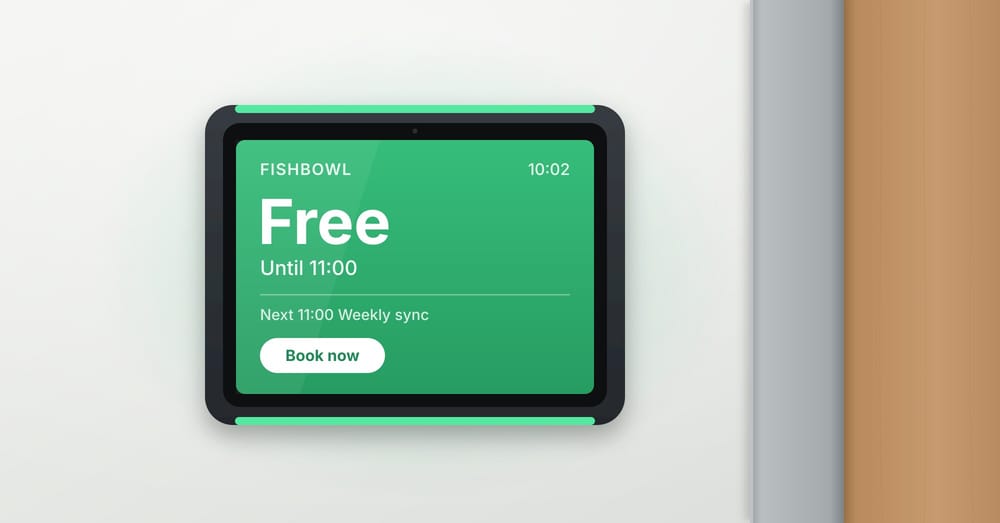
tl;dr - Bored Room is on the App Store. Built in under four days with Claude. Apple took 26 more. Bored Scanner is next.
The first real test
After I built Spex Glance, I wanted to know if Claude could fix a real problem for me. Not a toy. Something that's irked me for most of my 25+ years in IT.
Meeting room iPads were the pick. Every office build, the room displays came with a yearly license per room. For a sign that says free or busy. So the question was simple. Could I build the thing I'd been paying for? Bored Room was the first real test.
Bored Room turns an iPad outside a meeting room into that sign. It reads the room's Google Calendar and shows what's on now and what's next. Walk up, tap, book the room. That's the whole job.
It's 99 cents per iPad, once. No subscription, no account with me, no server of mine in the middle. The App Store privacy label says Data Not Collected because there's nothing to collect.
I built it with Claude. I brought the floor plan: years of mounting these things and knowing what annoyed me. Claude took everything off my plate that I'd never had time to learn: the Swift, the site, the setup guides, the App Store paperwork.
Build fast, then wait
First commit: October 13, mid-morning. Submitted to Apple: October 16, just after lunch. On sale: November 11.
- 3.5 days to build it.
- 26 days in review.
- 3 submissions, 2 rejections.
That's 29 days, and Apple had almost all of them. Building was the fast part. Review is the part nobody warns you about.
There were two gatekeepers, not one. Bored Room reads Google Calendar, so Google has to verify it too. Until it does, users see a scary "Google hasn't verified this app" screen. So I submitted to both on the same day and set the App Store release to manual. If Apple said yes first, the app would wait for Google. Google approved it in two days. Apple took 26.
Rejection one: a word
Six days in, on October 22, Apple rejected it under Guideline 4.8, Login Services. The rule says that if your app lets people log in with a service like Google, it also has to offer a privacy-friendly login like Sign in with Apple.
Bored Room has no logins. There are no accounts. The Google step only gives the iPad permission to read the room's calendar. But the button said "Sign in with Google," with a little person icon next to it. To a reviewer moving fast, that's a login.
So why not just add Sign in with Apple? Because it can't open a Google Calendar. And the guideline already has an exception for exactly this: apps that are a client for a specific service, where you sign in to that service to see your own content.
I replied the same day and explained. Then I renamed the button to "Connect Google Calendar," swapped the person icon for a calendar, and changed "Signed in as" to "Connected to." Same code, different words.
Apple didn't answer. By Monday, two and a half business days later, I stopped waiting and sent the renamed build. A reply can sit in "Rejected" forever. A new build puts you back in line.
Rejection two: a real bug
On November 4, nine days after the resubmit, rejected again. This time Apple was right. The reviewer crashed the app twice, tapping Book now on an iPad Air running iPadOS 27.
Here's what happened. Book now lets you pick a length with a slider, in 15-minute steps, up to the next meeting. If the next meeting is 15 to 29 minutes away, the only choice is 15 minutes. The slider runs from 15 to 15. Since iPadOS 26, a slider like that doesn't just look silly. It crashes.
You'd only hit it if you tapped Book now in a 14-minute window before a meeting. I never had. The reviewer, on their demo calendar, at 1:27 in the afternoon, did. Twice.
The fix was small: when there's only one choice, hide the slider and book 15 minutes. While I tested that on the real iPad, I found a second bug. A walk-in booking showed "Free" for up to a minute, because the booking started a few seconds after the board's clock ticked over. Bookings now start at the top of the minute, and the board flips to Busy right away.
Both fixes went back to Apple on November 6. Five days later, approved.
A crash that only shows up in a 14-minute window is still a crash. I'd rather Apple find it than a customer with a room full of people.
Meanwhile, Bored Scanner
While Bored Room sat in review, I started a second app in the family. Same irk, paying real money for a boring job. Different problem: asset inventory.
Bored Scanner is the camera front end for it. Point an iPhone at an equipment label and it reads the text, picks out the serial number, part number and MAC addresses, drops the rest, and flags anything it isn't sure about. Then it sends the record to Snipe-IT.
This one I'm building with Codex instead of Claude. It's still in development. Bored Room is live. Bored Scanner isn't, yet.
What I'm taking to the next one
Everything below should get the next Bored app built and shipped faster. Bored Scanner gets it first.
- Do the paperwork on day two. Paid Apps agreement, tax form, bank, the Small Business Program. Knock it out early and it never holds anything up.
- Release manually. If anything outside Apple has to be ready, hold the release until it is.
- Words are part of the interface. Reviewers read them literally. If it isn't a login, don't call it one.
- Don't wait on an appeal. If a reply sits for two or three business days, ship a build that removes the doubt.
- Test the edges. Try the smallest and largest value every control can get, on the newest OS. Then test the way the reviewer will: their demo account, a random time of day.
- Walk your own setup guide. The guides are there to empower somebody to set it up without calling me, so they'd better work. Before submitting, I followed mine click by click and found the room picker was empty for one setup path. No test caught that. Reading my own instructions did.
- Keep one release branch. Tag every release and run it through a written checklist before it goes out.
- Keep a log in the repo. Every session with Claude started from the plan and the decision log. That log is how I wrote this post.
Start to approval, the whole run
Here's every step Claude and I took with Apple, from empty project to on sale. Claude drove most of it through the App Store Connect API. When it couldn't reach something, like the agreements page, it told me where to look.
- Create the app record (Oct 13). Pick the bundle ID carefully. It's permanent after the first upload.
- Wire up TestFlight the same day. One script uploads every build, and the build number is the commit count.
- Do the business side (Oct 14). Paid Apps agreement, tax form, banking, Small Business Program, EU trader status.
- Get Google verified. Cut the Google permissions down to two and submit for verification (Oct 16).
- Walk the setup guides end to end. That's where the empty room picker turned up.
- Shoot the screenshots. Apple wants 13-inch iPad screenshots, so they came from the simulator. The first set was shot at 11 PM. Every room said Free.
- Submit with manual release (Oct 16).
- Rejection one, 4.8 (Oct 22). Reply with the exemption, rename the button, wait, then ship the renamed build (Oct 26).
- Rejection two, 2.1 crash (Nov 4). Fix it, test on a real iPad, and resubmit (Nov 6). The Resubmit button stays grayed out until you click Update Review first.
- Approved (Nov 11). Check the build, price and countries over the API. Check the agreements page by hand.
- Release. Send the release over the API, watch the storefronts flip to available, point the site at the listing, and tag the release.
Why I'm doing this
I'm really proud of this one. I've wanted to do it since the App Store opened: build apps that fill the gaps IT keeps running into. A simple need, a tool that costs too much or does too little, and nobody with the time to fix it.
Now I can. Lower overhead, my own deadlines. Nobody's pushing me to release these. No roadmap review, no sales target. I'm doing it to scratch an itch, and to help other IT admins out there who keep hitting the same walls.
If you run a few meeting rooms on Google Workspace and you're tired of paying a yearly license for a sign that says free or busy, give it a try. If it's missing the one thing that would make it work for you, tell me. The contact on the site comes straight to me.
What's on the roadmap
While this app sat with Apple for review I began tinkering with updates to the app. With how quickly I could develop and test this app with Claude, other functionality started coming to me.
- 1.1: Set up iPads from an iPhone. Scan a code, pick the room and calendar, done.
- 1.2: Check-in at the door. If nobody checks in, the room declines the meeting and gives itself back. It declines, it doesn't cancel.
- Support for light-up enclosures, so the room's Busy/Free status shows from down the hall with a red or green light.
- Microsoft 365 in the 2.0 release.
Links
- Bored Room on the App Store
- boredroom.space: setup guides, mounting and power, privacy
- boredsoftware.space: the Bored line of apps
- I Got Bored, So I Made Some Apps
- App Review Guideline 4.8: Login Services