AI · · 6 min
I Got Bored, So I Made Some Apps
tl;dr - One app idea became a suite. Scanner's the newest and most useful. Each one fixes an old IT irk. AI built what I never learned to code.
It started with a calendar
Bored Room started with a simple realization. The iPad outside a meeting room is just reading Google Calendar. Free or busy, what's on next, maybe a button to book the room. That's the whole job. Yet the products that do it come with per-room licenses, contracts, and a backend somebody has to run.
Run the math. 10 rooms, each with a yearly license. Three years in, you've paid for 30 licenses, and every screen still says free or busy.
So why build a whole backend to read a calendar? I didn't. Bored Room signs in with the Google Workspace you already have, reads the room's calendar, and shows it. No server of mine, no account to create with me. Keep it simple, keep it private.
I built it with Claude, the same way I built Spex Glance before it, and it's in review with Apple now.
One app turned into a list
Once one irk was fixed, I couldn't stop seeing the others. Packages piling up at the front desk with nobody told they're there. Guests signing a paper log in the lobby. Each one is a small job that somehow costs like a big one. Those became Bored Package and Bored Guest, and they're still on the drawing board.
Every one of these apps follows the same rules:
- One job each. No platform, no suite, no upsell.
- No accounts with me. I don't run any, so there's nothing to sign up for.
- No backend of mine. The apps talk to systems your IT team already owns. Nothing of mine sits in the middle for your security team to review.
- One price, paid once. 99 cents per app. No subscription, no contract.
Last night's idea
Last night I came up with the newest app on the roadmap, and it's the most useful of the bunch. Bored Scanner.
ChatGPT helped me design the foundation. Then I did what's become my routine. Spend about 30 minutes working out the plan with the AI, then send one last message: run the steps we talked about, document the progress, and leave me a list of anything I need to handle. Hit enter. Walk away. I guided it, set the guardrails, and let it run on its own to build the app I've always wanted.
Why inventory is brutal
Inventory of IT assets is brutal because accuracy counts. A wrong serial isn't a typo. It's a laptop you can't find, a warranty claim you can't make, or a machine still assigned to someone who left two years ago.
Here's how it usually goes. Plug a barcode scanner into a laptop. Scan the incoming boxes, aiming at the right barcode out of the five on every label: serial, part number, Wi-Fi, Ethernet, Bluetooth. Go back to your desk and clean up the data, or import it. And you're still not done. You still have to assign assets to employees, retire the old ones, and figure out what that mystery laptop you found in a closet is.
Run the math on accuracy. 40 laptops, five identifiers each, that's 200 values. Mis-scan one in fifty and you've got four bad records nobody finds until somebody can't get on the network.
And somebody always asks. Finance wants to know where a machine is in its lifecycle for an audit or a depreciation schedule. Security wants to know who has a laptop the minute it's reported lost or its owner walks out the door. Both want the answer on a minute's notice, not after you dig through a spreadsheet that's three weeks behind the floor.
What Scanner does
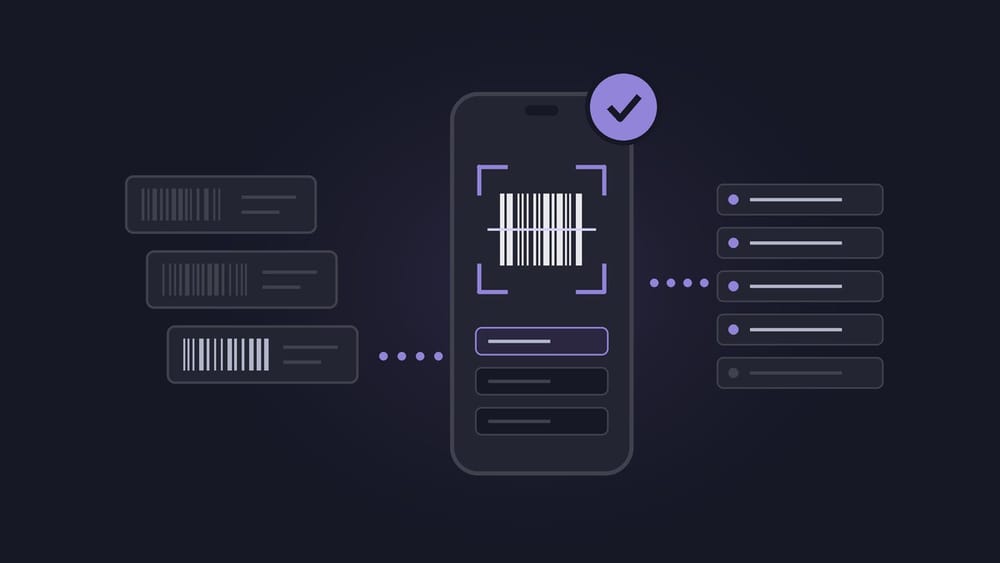
Scanner brings your asset management backend to your phone. It uses Apple's own text and barcode recognition through the camera, and talks directly to the asset system you already run. Four jobs, all on the device:
- Receive. Photograph the label and add the machine to inventory.
- Assign. Pick an employee and hand it off.
- Lookup. Scan the mystery laptop and see who it belongs to.
- Retire. Mark it done and keep the record.
That's what makes the answer for Finance and Security more reliable. Every receive, assign and retire lands in your asset system when it happens, checked by a person and confirmed by the server, not retyped during a cleanup session at your desk later. Fewer handoffs, fewer typos, fewer records that drift from reality. So when someone asks where a machine is in its lifecycle on a minute's notice, you can trust what the system tells you. And if you're standing next to the machine, a Lookup scan shows the model, the status and who has it.
Take photos and keep moving. There's no waiting between shots. Recognition runs in the background while you're snapping the next box.
Because accuracy counts, two rules don't bend:
- A person checks every value before it sends. A serial can be perfectly valid and still be the wrong serial. That check isn't waiting on better AI. It's the design.
- Done means the server agrees. The app reads the record back from your asset system and only calls it success when the fields match.
What building it taught me
The first recognition test read the label perfectly. It read all of it, including the country of manufacture, which showed up as a candidate inventory field. OCR doesn't know which words matter. It just reads. So Scanner looks for the printed label that says Serial or Wi-Fi and grabs what's next to it. An admin can switch off fields they don't track, like Bluetooth, and they drop out entirely.
My first plan was too big, too. I pictured a hosted database and an AI agent sitting in the middle of every scan. Then I asked the obvious question. Who already owns the asset record? Your asset system does. That's its whole job. So Scanner talks straight to it, and even pulls the employee list from it. Photos stay on the phone.
Testing earned its keep. I retired a test machine, scanned it again, and the app created a duplicate. The scanner was fine. Snipe-IT's normal asset list leaves out archived machines, so the app thought it was gone. Missing from a list isn't missing from the system. That one got fixed with tests behind it.
Where it stands
Scanner works today against Snipe-IT. Real label photos went through recognition, got checked, and landed in a Snipe-IT test environment with the readback matching. Receive, assign, lookup and retire all ran on a physical iPhone, and the test suite ran 99 tests with zero failures.
Snipe-IT is the first integration, not the last. Other asset systems are on the roadmap, and I'll add them the right way, working with each vendor and testing against a real environment before I call any of them supported. Some things are built but not proven yet. MDM setup for Jamf and Kandji is built but hasn't been through a real rollout. And I still need to finish testing on a physical iPad. Scanner goes to Apple review after that, behind Bored Room. No dates, no promises.
Putting them out into the world
Building Scanner is what pushed me to say this out loud. I intend to release these apps, and I hope businesses, small or large, can get something out of the shortcomings I've lived with for 25+ years.
All of them live at Bored Software, with what each one does and what it costs. Before anything goes live, I want to hear from you. If one solves something you've been overpaying for, tell me. If it's missing the one feature that would make it useful, tell me that more. The contact email on the site comes straight to me.
Scratching the itch
I know what's out there. I've used it, bought it, renewed it and defended it in budget meetings. So I was my own market research and my own UI guy. Every screen had to pass one test. Would the average IT person get it without reading anything? If it isn't easy enough for them to use, why build it?
That's the whole idea. If something irked me, one of these apps addresses that irk. AI finally let me build the tools I always wished I had time to learn to code. I'm scratching the itch, and I'm betting a lot of IT people have the same one.